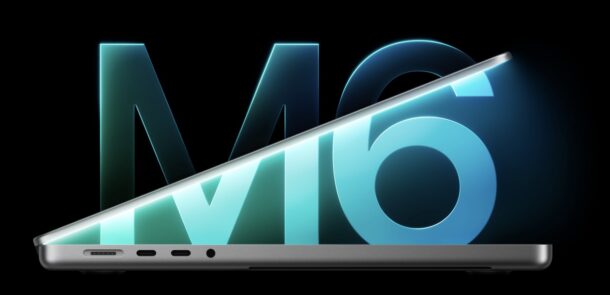
Apple has released a series of hardware updates this week, including an updated iPad Mini with A20 chip and OLED display, an iMac with M6 chip, and a 14″ MacBook Pro base model with M6 chip. These products were announced ahead of the “Pro and Tell” event set for tomorrow, which is expected to launch a touchscreen MacBook Pro.
MacOS Tahoe 26.7.2 and MacOS Sequoia 15.8.2 are available now as security software updates for Mac users who are continuing to run those operating systems. Those users will also find Safari 27.2 available as an update.
These updates include hundreds of security patches and fixes making them recommended to all users who are running macOS Tahoe or Sequoia, instead of MacOS 27 Golden Gate.
Separately, Apple has also released MacOS 27.2 Golden Gate, iOS 27.2, iPadOS 27.2, iOS 26.7.2, iPadOS 26.7.2, iOS 18.7.11, iPadOS 18.7.11, watchOS 27.2, tvOS 27.2, along with updates to just about every other Apple device, so you’ll want to check for and install updates elsewhere too.
Apple has released iOS 27.2 for iPhone, and ipadOS 27.2 for iPad. These updates include new Siri AI features, along with Siri AI support in new languages, unspecified bug fixes, and security patches, making them recommended for all iPhone and iPad users to install.
Additionally, Apple has also released MacOS 27.2 for Golden Gate users, MacOS Tahoe 26.7.2 update, HomePod OS 27.2 with support for Sound Glow on HomePod Mini and HomePod second gen, iOS 26.7.2, iPadOS 26.7.2, iOS 18.7.11, and iPadOS 18.7.11, tvOS 27.2, watchOS 27.2, and more, so you will want to update all of your Apple devices.
Apple has released MacOS 27.2 Golden Gate, the update includes new Siri AI features and support for Siri AI in additional languages, along with miscellaneous nonspecific bug fixes and security patches. Release notes are included below, along with download links for the full installer and IPSW file for MacOS 27.2.
Separately, Apple has also released MacOS Tahoe 26.7.2, MacOS Sequoia 15.8.2, iOS 27.2, iPadOS 27.2, along with 27.2 updates for WatchOS, tvOS, HomePod OS with SoundGlow support, and more, so check for updates on your other Apple devices as well.
And for those who are confused by versioning and numbers, apparently MacOS 27.2 leapfrogged MacOS 27.1 which was never released to the public, and the same applies to iOS 27.2 which leapfrogged iOS 27.1 that was also never released.
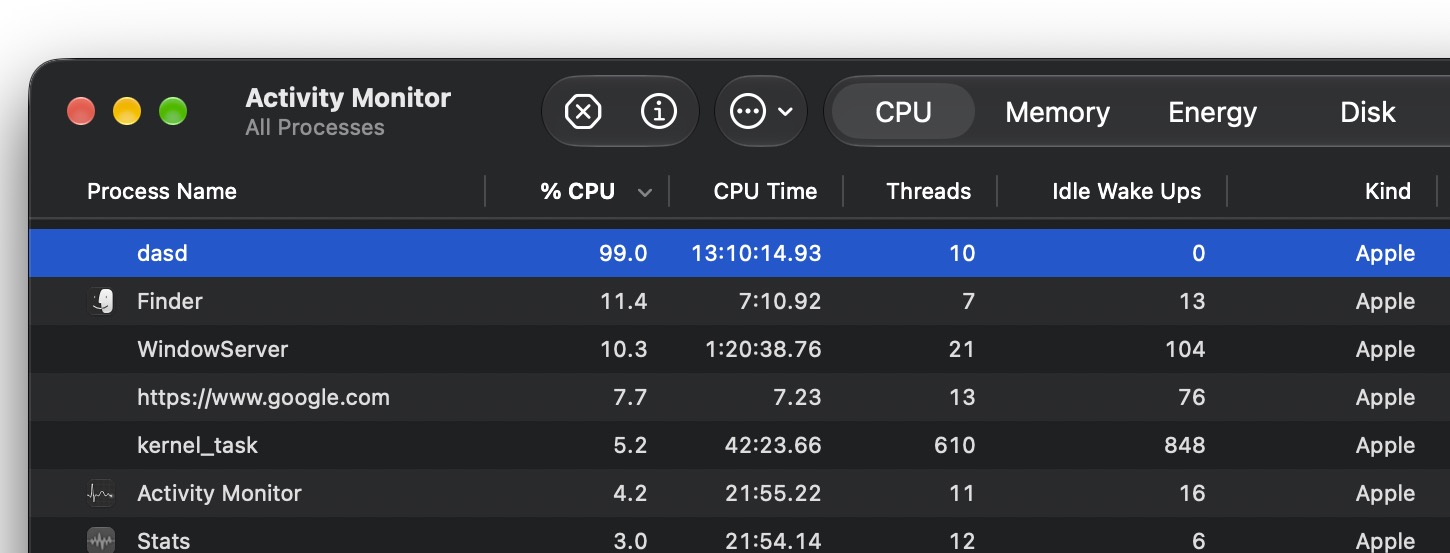
I ran into a peculiar issue recently where the ‘dasd’ process had been consuming 100% CPU for several days straight. Since dasd is a system process, my initial assumption was that there must be some important background task that was going on. But, after a few days of no change and dasd constantly hovering between 90-100% CPU usage, contributing to significant battery drain and resource misallocation, I decided to dive into troubleshooting dasd consuming large amount of processor specifically in MacOS 27 Golden Gate.
With the help of some tinkering around in Console and Terminal, an agent, and ChatGPT, I discovered the problem with dasd going haywire may be related to an issue with telemetry and the PowerLog background processing database in MacOS. And, as it turns out, clearing this particular database and then restarting the Mac can resolve the problem.
Be forewarned, these steps involve using the Terminal to delete a system file that is actively being written to, so something could always go wrong. Backup your Mac before beginning.
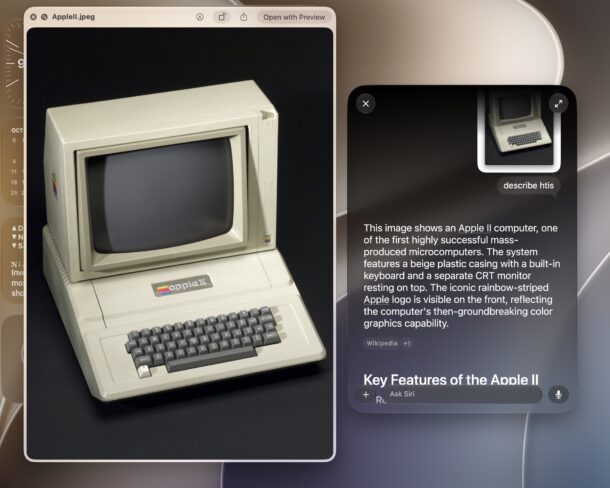
Visual Intelligence offers a set of AI features that can be used to identify objects and items in photos or things on screen, and a neat new feature available in MacOS 27 Golden Gate allows you to interact with Siri and Visual Intelligence from just about anywhere on your Mac. You can use this to help identify things in pictures, understand a document, or even to learn what a particular file or app is for if you aren’t sure.
If you have been shopping for a high end M5 Max MacBook Pro 16″ model with 36GB RAM and 2 TB SSD and waiting for a whopper discount, now might be time to act. Amazon is cutting a whopping $900 off the retail price of this top-of-the-line MacBook Pro, or a more modest yet still generous $500 off the 24GB/1TB model of the 16″ MBP.
These are incredibly powerful Macs and it’s rare to see such generous discounts available, check them out!
FTC: OSXDaily is an affiliate partner with Amazon, meaning if you click a link and make a purchase, we may receive a small payment which goes towards keeping the site running.
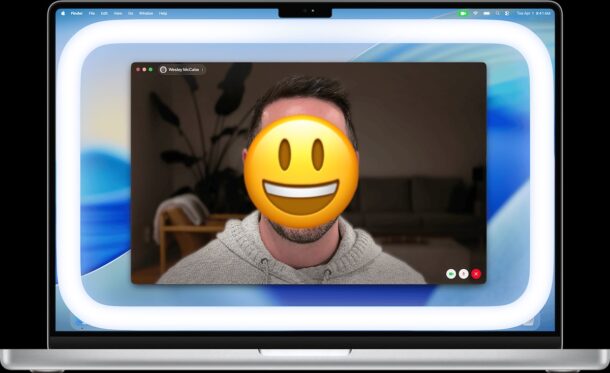
The Edge Light feature of FaceTime for Mac enables a virtual ring light on your screen during FaceTime calls, which helps to more evenly illuminate your face. This is particularly useful in lower light conditions, and it can improve the appearance of a FaceTime call quite a bit. Ring Lighting is commonly used in media for all sorts of portraiture and photography, and in the modern era of video conferences and video chat, it’s also quite popular for average users too, so it’s a nice addition to MacOS.
Edge Lighting is not typically enabled by default in FaceTime on the Mac, but it can be enabled or disabled at ease, as we’ll show you.
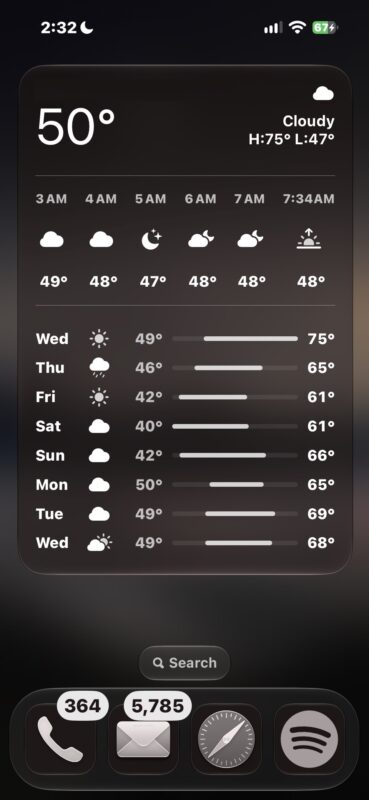
One of the more compelling new subtler features introduced iOS 27 pertains to the ability to use full screen Widgets on iPhone. Full screen widgets can effectively turn a Home Screen page into a full mini-app of whatever the full screen widget is.
For example, you can have the full screen Weather widget, which shows a full longterm forecast and weather conditions right on the iPhone Home Screen, without having to open the Weather app. Or another popular example, is to use the full screen Photos widget, which lets you have a full Home Screen page dedicated to the photos widget and showing photos you might enjoy.
Full screen widgets are compelling for iPhone, here’s how to add one on your Home Screen.
The Mac mini and Mac Studio are both increasingly popular, not only as desktop Macs, but also for local AI setups. Amazon is taking up to $150 off the Mac mini configs, and $200 off a well-equipped Mac Studio:
FTC: OSXDaily is an affiliate partner with Amazon, meaning if you click a link and make a purchase, we may receive a small payment which goes towards keeping the site running.
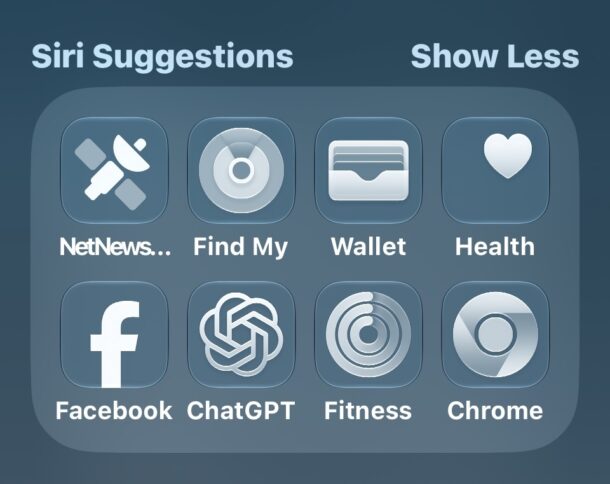
Siri Suggestions is a feature in Spotlight search for iPhone and iPad that suggests apps to open. The apps shown in this list are based on a few factors, including frequency of use, time of use, recency of use, and other algorithmic factors, but there are times the apps shown are not helpful, not in line with apps you’d be using, or that you simply don’t want those apps shown as suggested in Siri Suggestions.
Fortunately, with minimal effort you can remove an app from the Siri Suggestions of Spotlight on iPhone or iPad.
Apple has set an event for next week, October 28, using the tagline “pro and tell” to describe the “special Apple experience” that select influencers and press were invited to.
The “pro and tell” tagline certainly seems to suggest that Pro products will get updates, which is in line with rumors that suggest MacBook Pro could get a redesign, new M6 processors, and even include touch screen support. There are also rumors of updates to the iMac lineup, and potentially a revamped iPad mini as well. As usual, these are just rumors circulating until Apple announces anything official.
It’s also likely that we’ll get the release date, or perhaps the software release itself, of iOS 27.2, MacOS 27.2, and iPadOS 27.2, at the October 28 event, since those versions of system software are currently in beta that were just updated to Release Candidate builds.
This is the second Apple event to be held this month, as just last week Apple announced the HomeView product, along with updating HomePod mini and Apple TV.
Apple has issued the first Release Candidate builds of iOS 27.2, MacOS 27.2 Golden Gate, and iPadOS 27.2, for users who are in the beta testing program for Apple system software. A Release Candidate (RC) build typically matches the final version of the beta testing process, absent any last minute issues or changes.
Aside from the RC designation, it is highly likely that iOS 27.2, MacOS 27.2 Golden Gate, and iPadOS 27.2 will be finalized in the near future, because Apple just announced another event next week.
iOS 27.2 includes support for using Siri AI in several new languages and regions, includes a redesigned Health app with Longevity and Insights scores that gather from Apple Watch, and presumably bug fixes and security enhancements as well. It’s also likely that MacOS 27.2 Golden Gate, and ipadOS 27.2 will also include bug fixes and improvements.
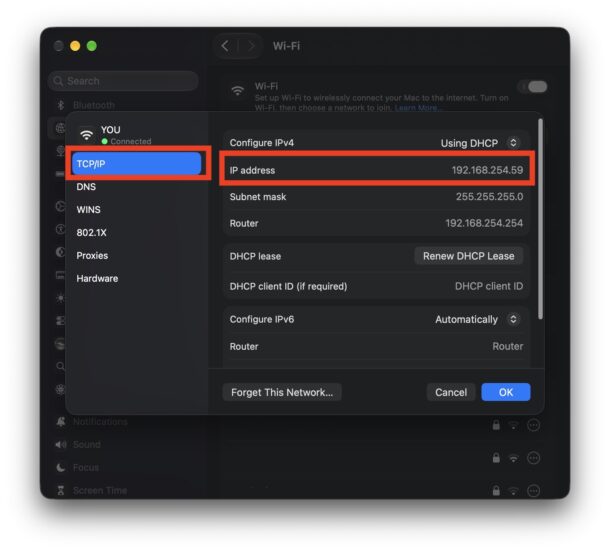
You might occasionally find yourself in a situation where you need to know the IP address of a Mac. Once upon a time, in Mac OS X users could instantly see their IP address when selecting the “Network” preference panel, but that is no longer the case in modern MacOS versions that have System Settings. Now, you’ll have to dig a little deeper to retrieve your IP address on a Mac, but it’s still pretty simple.
Here’s what you’ll want to do with a modern MacOS version, including MacOS 27 Golden Gate, 26 Tahoe, 15 Sequoia, 14 Sonoma, and macOS versions with “System Settings”.
While Apple is mostly sold out of November 13 delivery HomeView’s and is providing early-to-mid December deliver estimates, it appears that Amazon is not. In fact, Amazon is not only still accepting pre-orders for HomeView, but they’re also offering some color models at a small discount. Currently the $10 discount applies to the Starlight and Rose Pink models, but stock and pricing changes quick on Amazon.
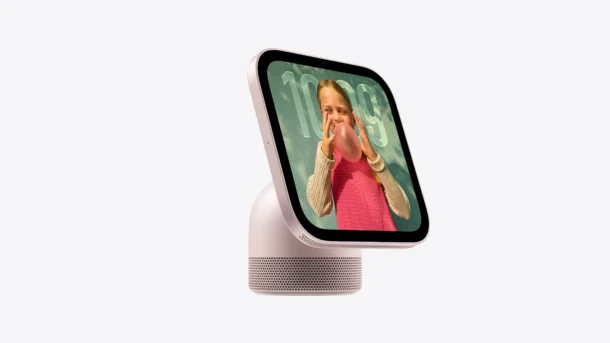
The HomeView is an interesting new home device introduced by Apple. With a 7″ screen that shows widgets, clocks, and photo slideshows, and a Home Screen complete with Safari, Music, Messages, FaceTime, Reminders, and support for Siri AI assuming your connected iPhone or iPad supports Siri AI anyway. It has an on-screen keyboard for when you need it, and some neat features like Safari having a capability to convert any webpage that is a recipe into a full-screen swipeable cookbook. HomeView is available in Silver, Starlight, Rose Pink, and Space Grey color options, and there’s also a wall mount version that does not include the speaker base.
HomeView is almost certain to be a popular gift this holiday season for people who are heavily in the Apple ecosystem, as those who are Android users without iCloud probably won’t get as much utility out of the device.
FTC: OSXDaily is an affiliate partner with Amazon, meaning if you click a link and make a purchase, we may receive a small payment which goes towards keeping the site running.
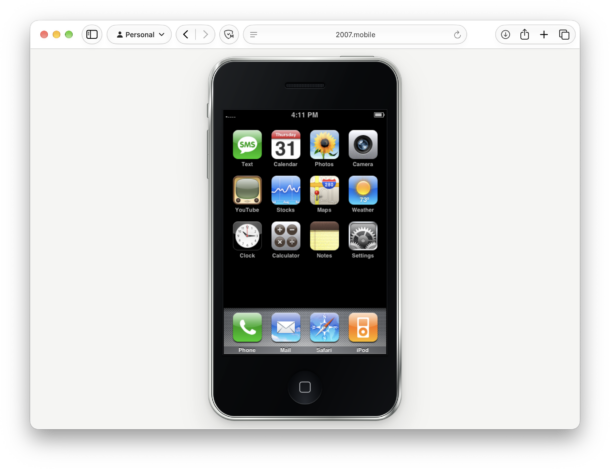
Whether you had the original iPhone or just dreamt of one, you can step back in time 19 years(!) and re-experience the original iPhone running iPhoneOS 1.0 in an emulator within any modern web browser. Play around with the original apps on the original iPhone experience, which all function as they should, though the emulated Safari does not have the ability to connect to the internet. You’ll quickly recall that many of the original iPhone apps were quite different and had names; Music was called iPod because Apple still made iPods at the time, Messages was called Texts because iMessage hadn’t debuted yet, there was no App Store or third party apps, there was no iCloud yet, and lots of other interesting little reminders of the first iPhone experience, before iPhoneOS was renamed iOS, and before many other features even existed.
Aside from a trip down memory lane and the nostalgic factor, there’s not a lot of utility to this, but it sure is fun to see how far iPhone and iOS has come. All you need is a web browser, then simply swipe to unlock, and click around.
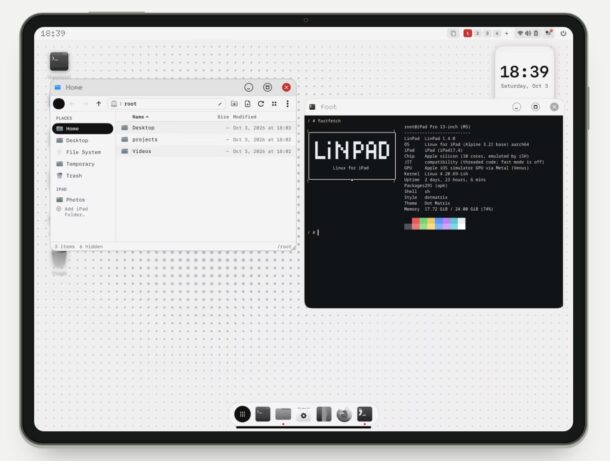
iPad has many uses, either as a touch device, or even as a pseudo-laptop of sorts with the Magic Keyboard, or as a desktop-like device with an external mouse and keyboard, and for better or worse, iPad is always running iPadOS. While many Mac users wish iPad could also run MacOS, a completely different and new option outside of the Apple ecosystem is available for the adventurous; running Linux on iPad, with the help of the new LinPad app.
If you’ve ever wanted live video wallpapers on your Mac, the Phosphene app will bring your MacOS desktop to life. But that’s not all, Phosphene is also able to add your own videos to the native wallpaper and screen saver pipeline on the Mac, letting MacOS play your own videos on both your desktop, and your Mac lock screen.